Big & Bulky
Warp · Shopify app · Case study

Warp Big & Bulky · Shopify app · 2026

You bought a couch.

Then you wait for a phone call to schedule it. For anything big and heavy, checkout makes a delivery promise it cannot keep, and the real scheduling happens later, by phone, after your money is gone. I designed and built the Warp app that turns that moment into a real, dated delivery choice inside Shopify.
Solo build Verified live on a Plus dev store Submitted to Shopify review Charges $0
Role
Product designer and builder, solo. Product design first, then I wrote the app, directing AI to do most of the typing.
What's mine
The problem, the flows, the data model, the honesty rules in the UI, the billing redesign, the release calls, and the debugging.
Team
Warp's CRO and a teammate drove product direction in weekly reviews. The freight backend is the Warp team's. The app is mine, every line of it.
When & stack
March to July 2026. Remix, Polaris, three Shopify extensions, Prisma, Vercel.
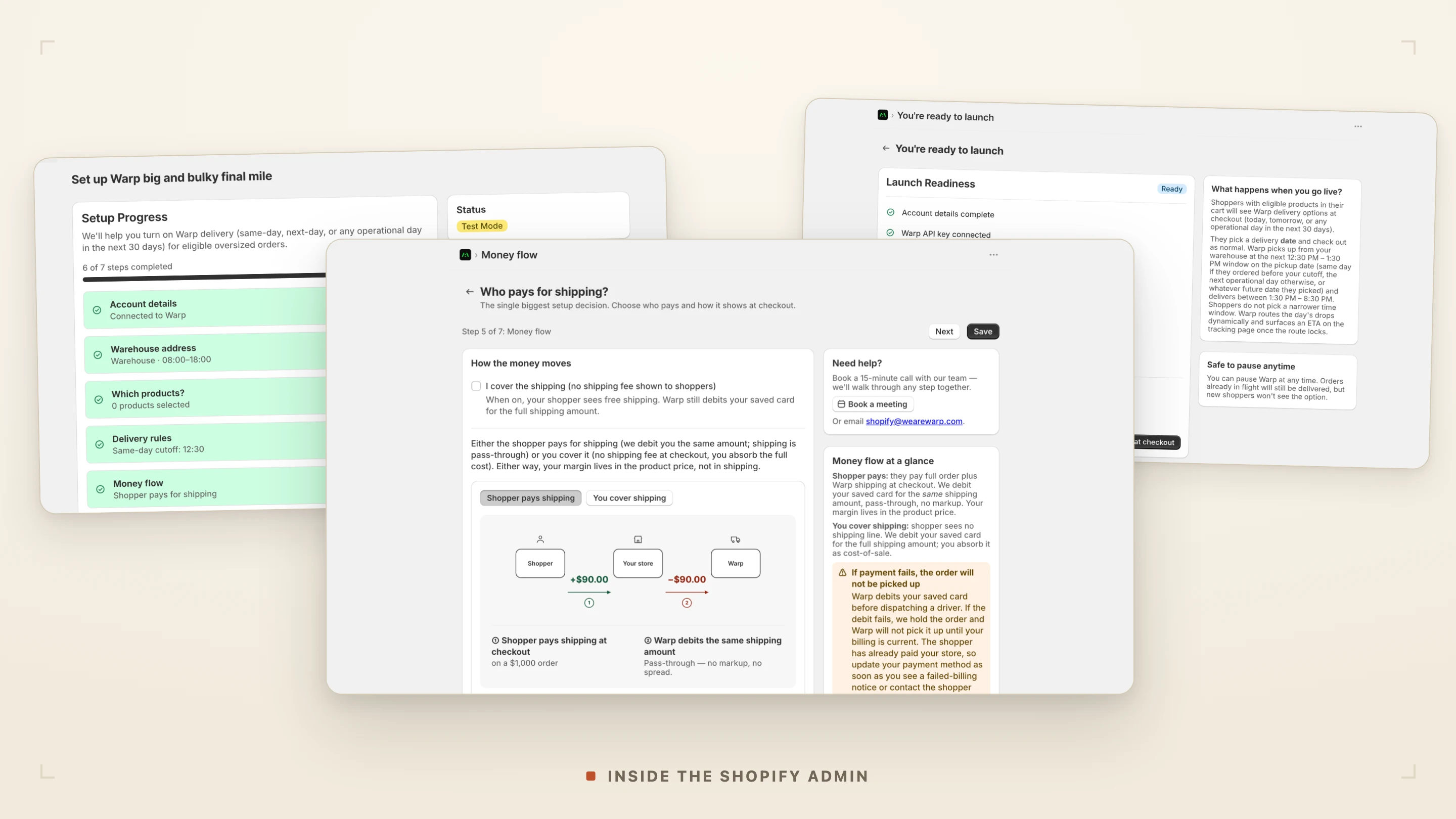
Inside the Shopify adminWhere the merchant sets it up
Three real screens from the Warp Big and Bulky app in the Shopify admin: the seven-step setup checklist, the money-flow step showing pass-through billing, and the launch-readiness check.
Fig. 01The merchant's side. Three real screens from the Shopify admin: the seven-step setup checklist, the money-flow step, and the launch-readiness check. The checkout a shopper sees, and the tracking after, come later.
At a glanceThe thirty-second version

Buy a book and checkout knows what happens next. Buy a sofa and it guesses. Warp puts a real delivery date in the same place a shopper already picks shipping, then books the freight in the background.
The merchant
Seven steps in the Shopify admin: warehouse, eligible products, delivery rules, who pays, and the rules of the road. Set once.
The shopper
One dated choice at checkout. Warp · 07/08, priced like any other rate, with nothing new to learn.
The operations
After the order, the app books the freight, holds it until pickup is confirmed, and hands over a tracking page.
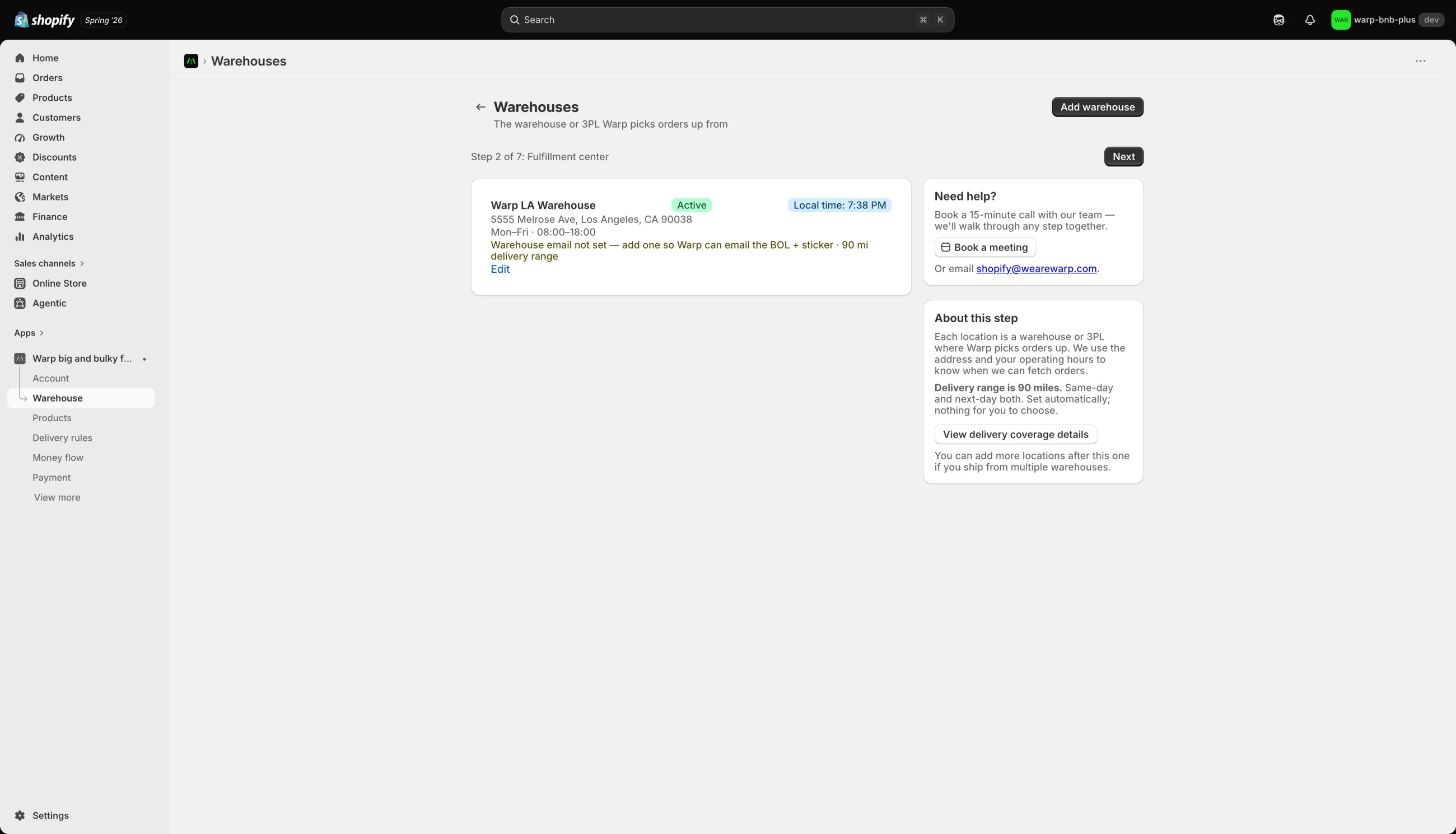
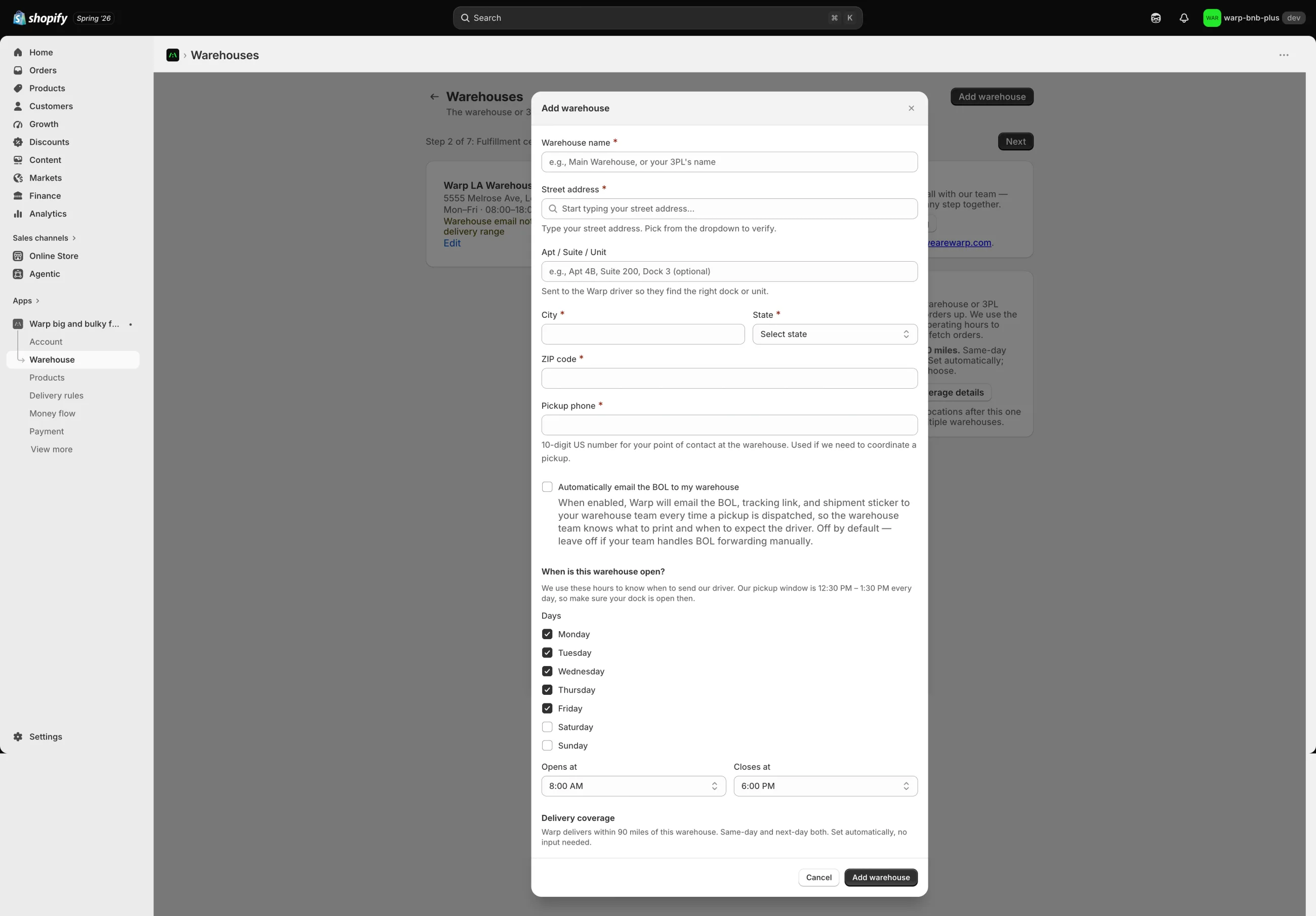
The Warehouses step in the Shopify admin: one active fulfillment center, Warp LA Warehouse, with its weekday operating hours and a note reading that Warp's delivery range is 90 miles, set automatically with nothing for the merchant to choose.
Fig. 02A real screen, already built. The Warehouses step in the admin: one active fulfillment center with its open hours, and a 90-mile delivery range Warp sets automatically. The merchant chooses nothing about range; the app already knows how far a truck reaches in a day.
1,493
Tests green, on a solo build, all mine. Built, hardened, and submitted to Shopify review, then verified working live on a Shopify Plus development store. It is not publicly listed, so no shopper has used it yet.
Big-and-bulky consumer checkout One platform, Shopify Pass-through billing, no markup
01 The problem Where checkout gives up

Checkout was built for parcels, not freight.

Everything that makes checkout feel solid was built for parcels. Freight fits none of it.

You get a vague three to five business days, you pay, and a week later a person calls to arrange the real delivery. The part that matters most for something heavy, when it shows up and whether you will be home, is the part checkout waves away.

I bought a couch, and now I wait for someone to call me.
The status quo for anything big and heavy.
Before
Fig. 03The status quo: one vague option, "3 to 5 business days," with no real date to plan a delivery around.
After
Fig. 04The same moment with Warp: each option is a real day the freight can arrive, sitting where shipping already lives. Drawn to show the pattern; the live dev-store render is further down.
02 The reframe Where the design budget went

The first customer is the merchant, not the shopper.

It reset the whole project.

In an app that lives inside Shopify, the merchant decides to install it and keep it. If they cannot get through setup, or cannot see how it makes them money in the first minute, no shopper ever reaches the checkout I was fussing over. So I moved the design budget. The merchant's onboarding got the care. The shopper's checkout got calm defaults and nothing to think about.

The other thing the research gave me was mine to carry: for a commerce app, onboarding is the whole experience. A merchant sets it up once and forgets it exists while orders flow in the background. They never get a second chance to be impressed, so whatever friction sits in setup is the product.
The brief I was handed
Polish the checkout the shopper sees.
The brief I shipped against
Win the merchant's first five minutes, because no shopper reaches checkout otherwise.
01
Merchant installsFrom the Shopify App Store, into their admin.
02
Merchant finishes setupSeven steps. The one place friction can kill the whole thing.
03
Shopper sees Warp at checkoutOnly now does the surface I was polishing ever appear.
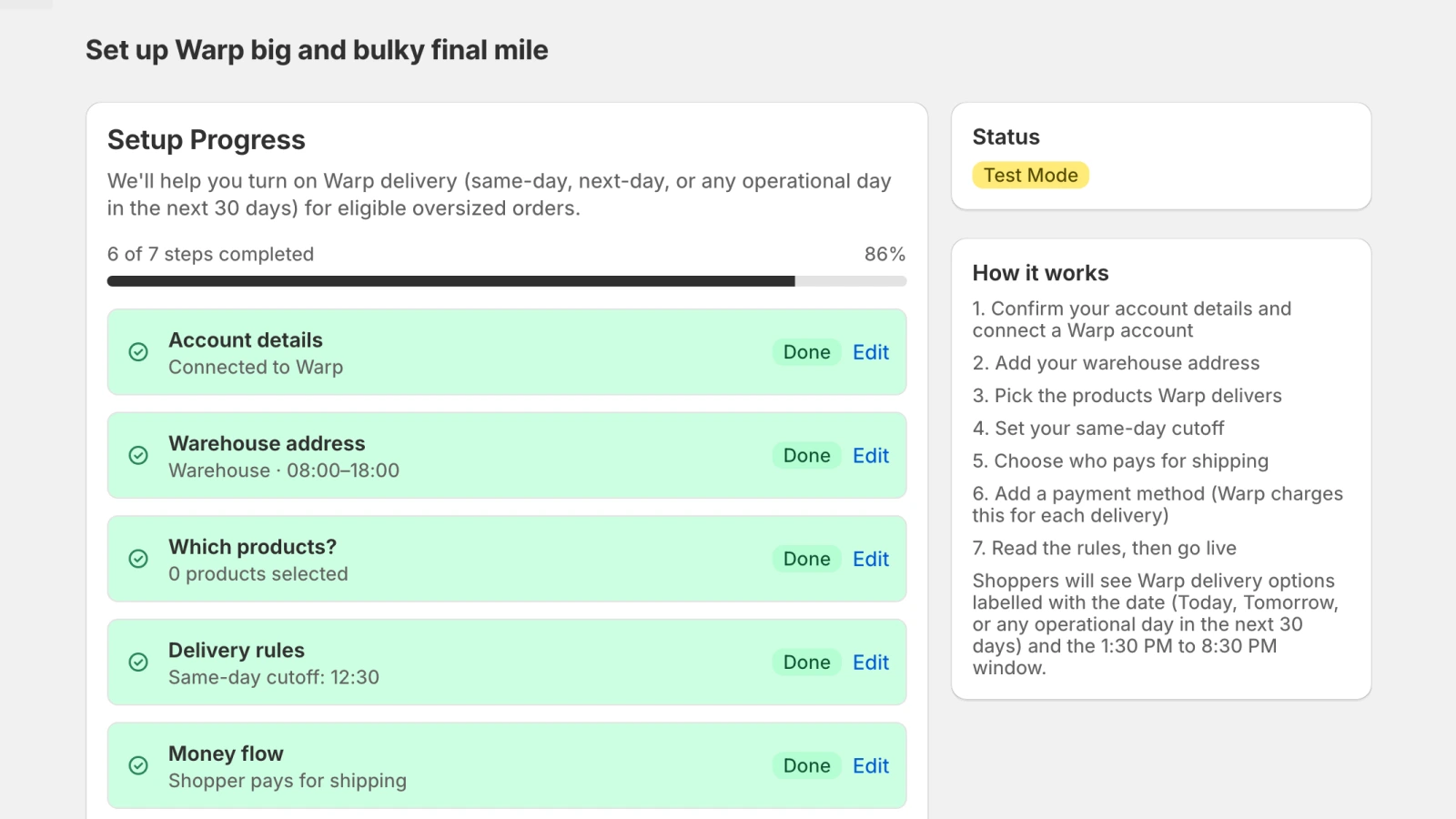
The merchant onboarding home in the Shopify admin: Set up Warp big and bulky final mile, a setup-progress card reading 6 of 7 steps completed at 86 percent, with rows for account details, warehouse, products, delivery rules and money flow each marked done.
Fig. 05The merchant's first five minutes. The onboarding home in the Shopify admin: a seven-step checklist reading "6 of 7 steps completed," each done step a green row, one step still to go before the store can go live.
The add-warehouse form in the Shopify admin, open as a modal: fields for warehouse name, street address, pickup phone and open hours; a toggle to automatically email the bill of lading, tracking link and shipment sticker to the warehouse team on every dispatched pickup; and a delivery-coverage note that Warp delivers within 90 miles, set automatically with no input needed.
Fig. 06One setup step, up close. Adding a warehouse takes what Warp needs to run a pickup: the address, a contact, the open hours, and one optional toggle that emails the bill of lading, tracking link, and shipment sticker to the warehouse team on every dispatched pickup. The 90-mile coverage is set for the merchant, never asked of them.
03 The solution Admin, checkout, ops

Three surfaces, one delivery promise.

The app lives in three places.

A seven-step setup wizard in the Shopify admin. The rates a shopper sees at checkout. And the quiet operations after purchase, where it books the freight, holds the order until pickup is confirmed, and hands the shopper a tracking page.

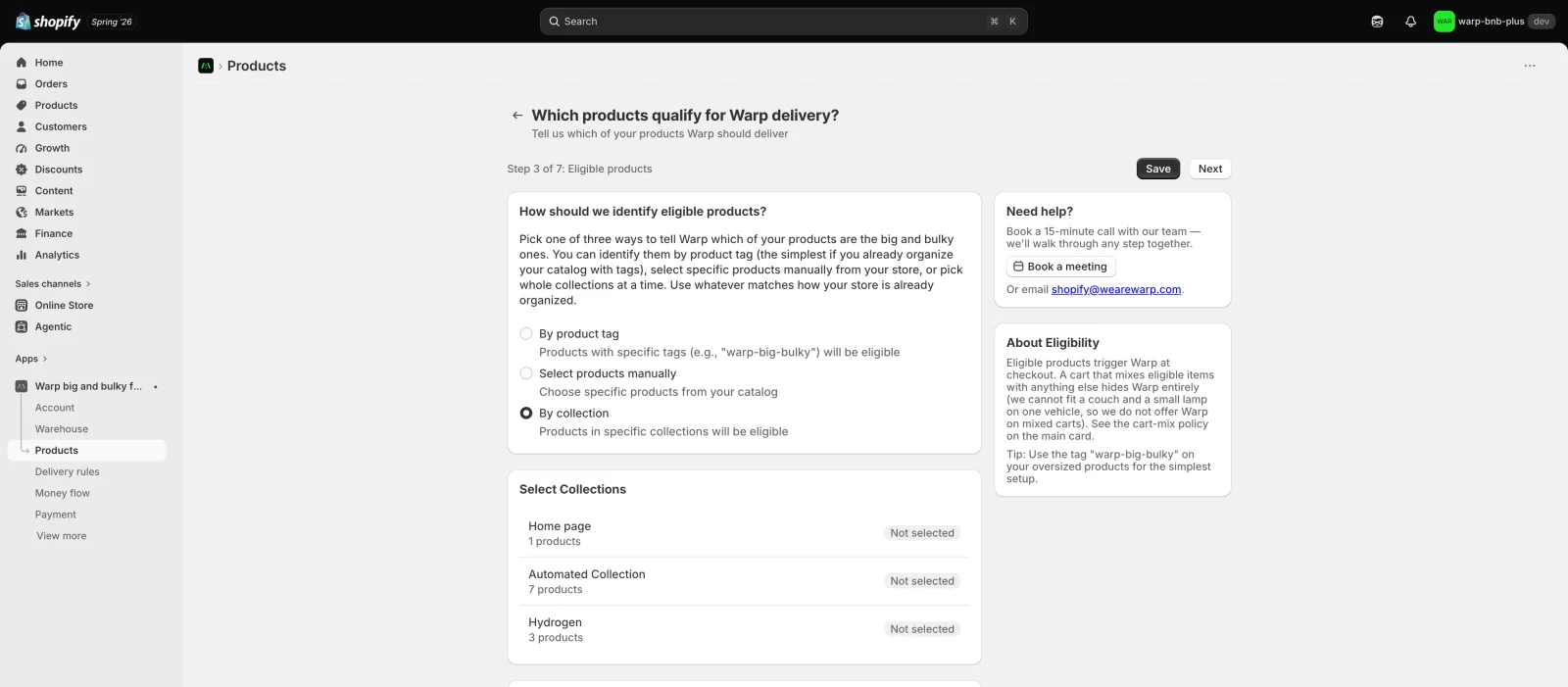
The first thing the merchant chooses about their own catalog is which products even qualify for Warp. The screen below is where they say so, and where the hard limits are drawn in the same breath.
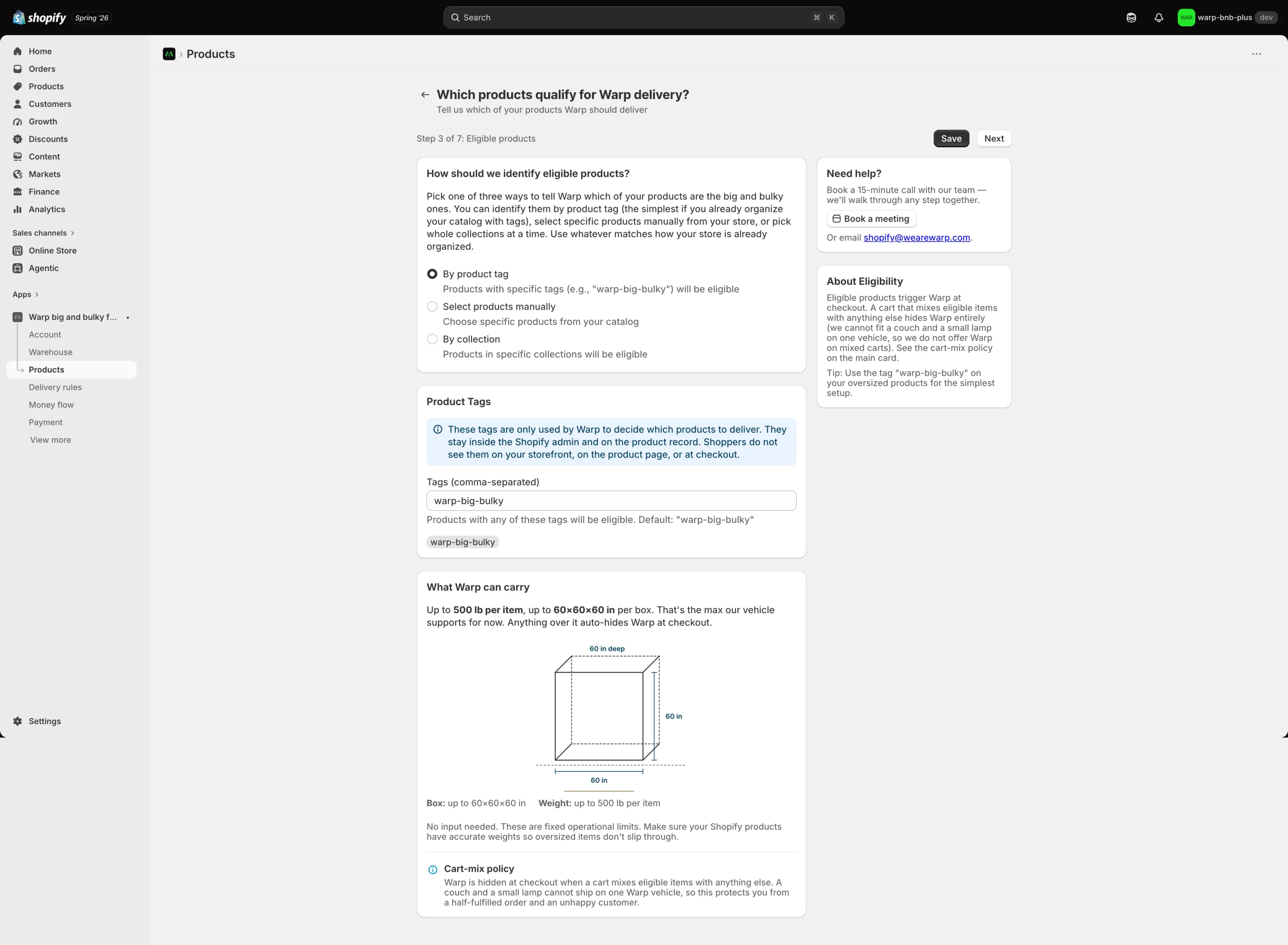
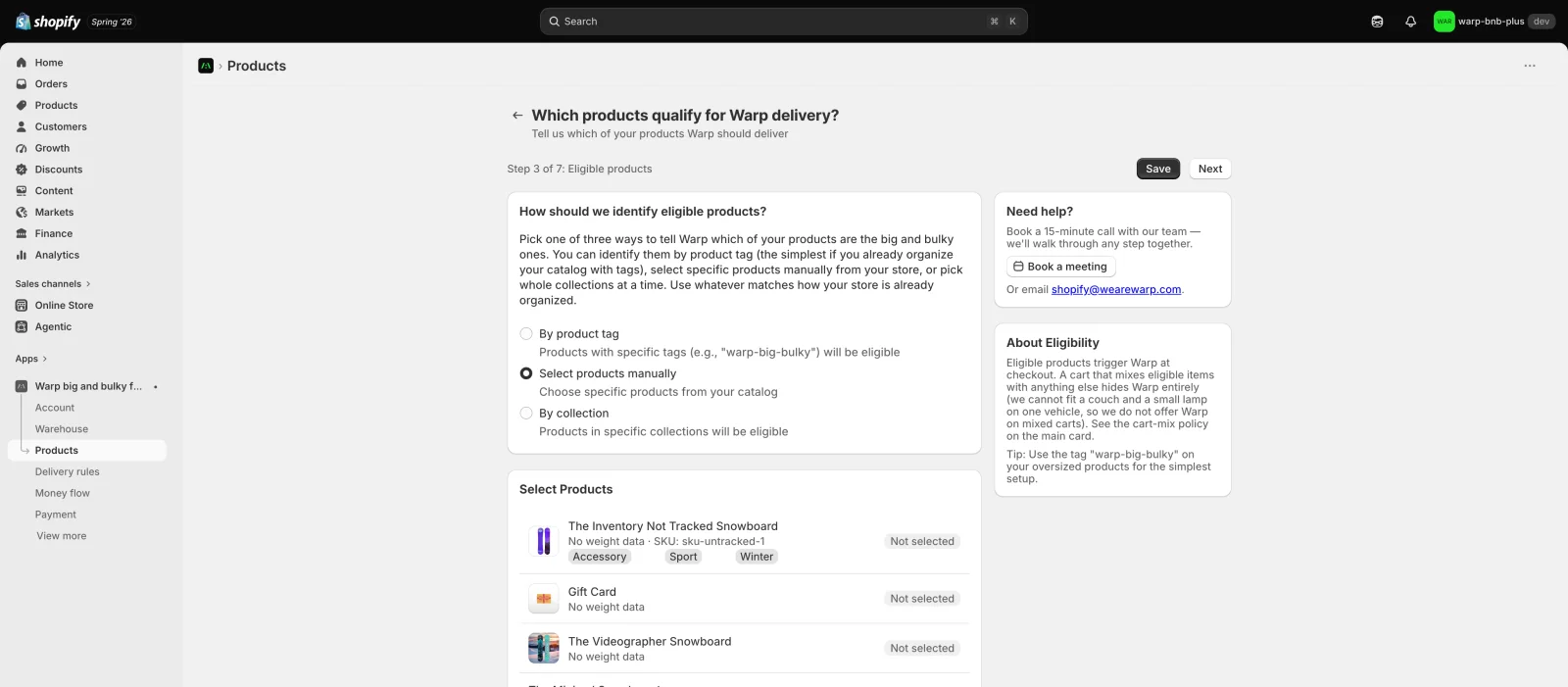
The eligible-products step in the Shopify admin, step 3 of 7. A merchant picks one of three ways to identify big-and-bulky products: by product tag (selected), by selecting products manually, or by collection. A Product Tags card holds the tag warp-big-bulky, with a note that the tag is only used by Warp and shoppers never see it. Below, a What Warp can carry panel states the fixed limits: up to 500 lb per item and up to 60 by 60 by 60 inches per box, with a cart-mix policy note.
Fig. 07Which products qualify, and the limits, in one screen. The default path tags a product "warp-big-bulky," a tag the shopper never sees. Below it, the hard limits are stated plainly on the same screen: up to 500 lb per item and 60 by 60 by 60 inches per box, and anything over that quietly hides Warp at checkout instead of promising a delivery it cannot make.
The second way · by handThe same eligible-products step with Select products manually chosen: a scrollable list of the store's products, each with a Not selected control, so the merchant can pick big-and-bulky items one by one.
The third way · by collectionThe same step with By collection chosen: a list of the store's collections, Home page, Automated Collection and Hydrogen, each selectable so a whole collection becomes eligible at once.
Fig. 08Two more ways to say the same thing. If tags do not fit the store, the merchant picks products by hand or points Warp at whole collections. One decision, three routes into it, so setup fits the catalog a store already keeps.

I made the delivery date a property of the shipping rate itself, so "Warp · 07/08" is just another rate Shopify already knows how to show. Scheduling works on every Shopify plan that way, with the richer in-checkout card as a bonus on the plans that support it. It trades a slicker widget for far wider reach, which is the right trade for a wedge.
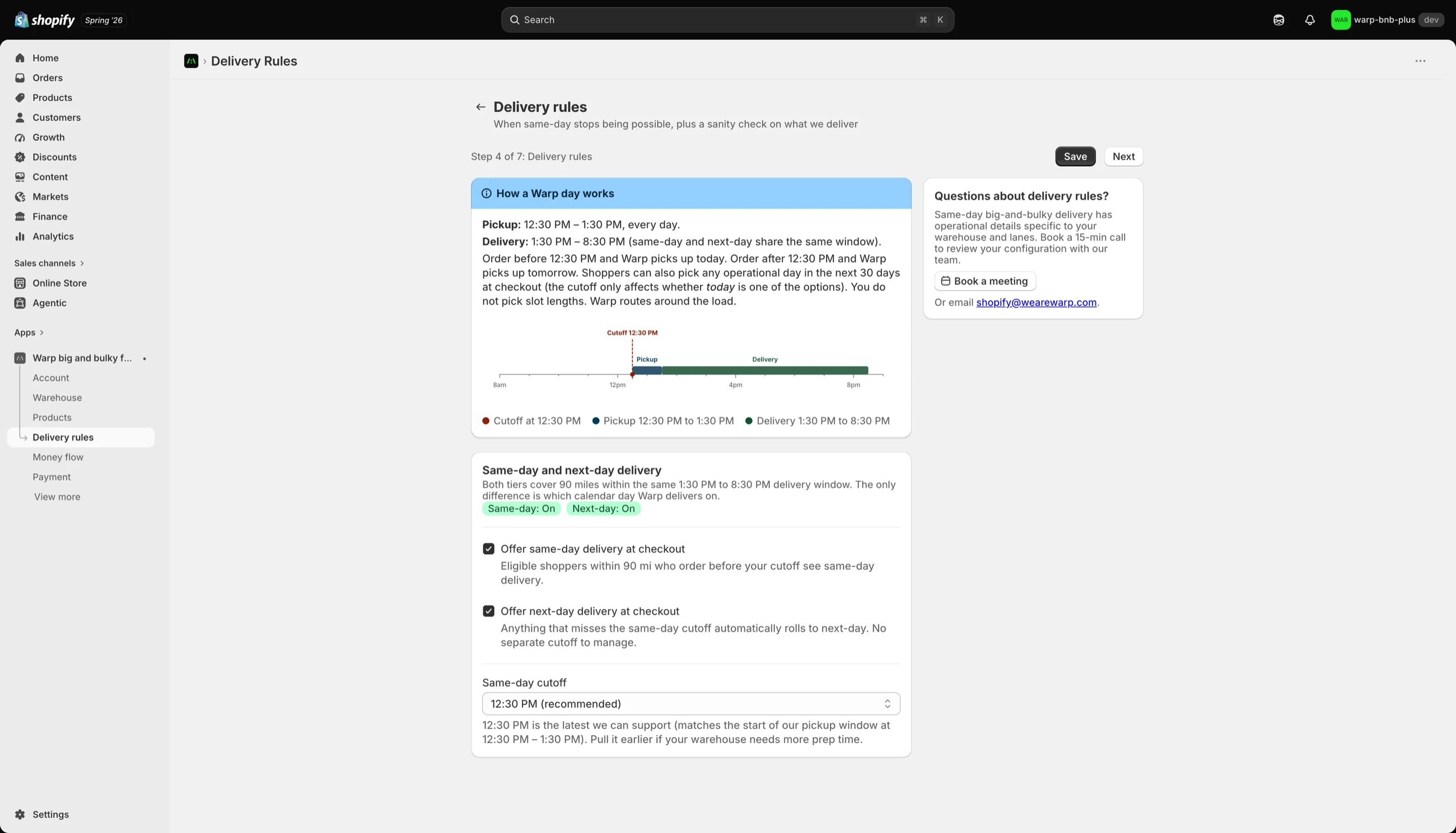
The delivery-rules step in the Shopify admin: a card titled How a Warp day works, with a timeline from 8am to 8pm marking a 12:30 PM cutoff, a 12:30 to 1:30 PM pickup window, and a 1:30 to 8:30 PM delivery window; same-day and next-day are both toggled on.
Fig. 09A real day the freight can arrive. The delivery-rules step draws the Warp day: a 12:30 PM cutoff, a 12:30 to 1:30 PM pickup, a 1:30 to 8:30 PM delivery. That machinery is what lets "Warp · 07/08" behave like an ordinary shipping rate a shopper just picks.
04 The core Every label is true

Every label equals what actually happens.

This app moves real money and makes real delivery promises, so a label that does not match reality is worse than something ugly.

Four decisions that shipped, each of them defensible line by line in the code.
01
Booking in progress, not confirmed.The shopper pays the store first, and Warp books the freight a moment later. There is no honest "confirmed" at the instant checkout completes, so the shopper never sees one. They see where the order actually is.
02
Two separate vocabularies.The shopper's status and the merchant's status never share words. A shopper who already paid never sees "payment pending." That is the merchant's thing to resolve, and it stays on the merchant's screen.
03
Pick a date, not a time window.The first spec had a two-hour slot picker. Warp cannot guarantee two hours, so the shipped rule is a date with an 8:30 PM outside bound. I will not design a precision the operation cannot serve.
04
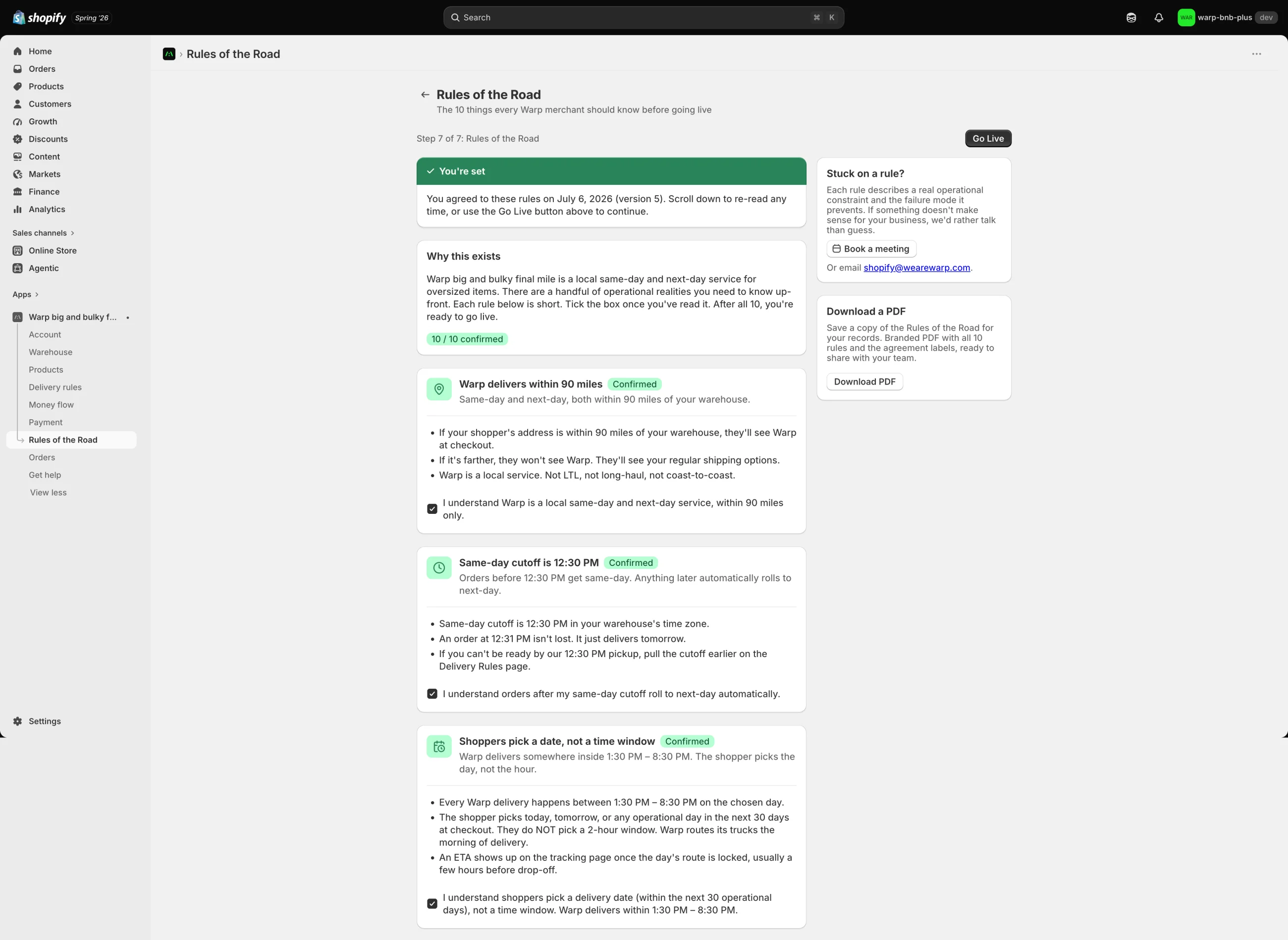
No markup, no spread.The billing screen says it plainly and makes the merchant tick a box to acknowledge it. A grep of the code turns up no markup field, no spread, no margin, because none of them exist.
The Rules of the Road step in the Shopify admin, headed 'The 10 things every Warp merchant should know before going live,' with a green 'You're set' banner, a '10 of 10 confirmed' status, and rule cards each marked Confirmed with an acknowledgement checkbox: Warp delivers within 90 miles; same-day cutoff is 12:30 PM; shoppers pick a date, not a time window.
Fig. 10Ten operational truths, read and ticked before go-live. Rather than engineer every hard edge away, the app names it: the 90-mile limit, the 12:30 cutoff, "pick a date, not a window." The merchant reads and acknowledges each of the ten before the store can go live.
Fig. 11What the shopper actually sees. The status the instant checkout completes: "Booking in progress," never a "confirmed" the app can't honestly promise before Warp has taken the job. Drawn here as a specimen of the app's status vocabulary; the shopper's full live tracking page renders only on the Plus dev store.
05 The hard part Six weeks of the wrong bug

Rejected six times for a bug that wasn't in the code.

Shopify rejected the app about six times over roughly six weeks, always on the same rule: the checkout extension "did not display." The code was correct, and an audit confirmed it. The real cause took actual debugging to find, and it was never where the rejection pointed.

3h
Reviewed in under three hours. One bug.

I had braced for a four to six week queue. Shopify picked it up in under three hours, which told me the submission package was complete. Then it came back with a single rejection: the checkout card rendered nothing. They had tested a Helsinki, euro checkout, where Warp correctly returns no rate, so of course nothing showed. Fast pickup, not a pass.

×6
The same rejection, over and over.

"Checkout extensions must display properly." I kept re-reading the code that drew the card. It was fine. Chasing a rendering bug in correct code is a special kind of stuck.

Logs
I stopped trusting the rejection and read the logs.

Two real failures were sitting in the carrier-service logs the whole time. Shopify sends null for an empty optional field. My schema used a rule that accepts a missing field but rejects a null one. A single null failed the whole check and hid every Warp rate.

.optional() .nullish()

One word, plus a regression test that reproduces both logged failures.

Plus
The card was Plus-only. The store wasn't.

In-checkout extensions are a Shopify Plus feature. The demo store had drifted onto a lower plan, so the card could never render for a reviewer, whatever the code did. The earlier plan had written this off as unfixable. It wasn't. Shopify hands you a free Plus development store for exactly this, and an unsaved block previews in the editor but never renders on a live checkout, which was its own quiet trap.

7/6
The whole checkout, working, on a real Plus store.

I spun up the free Plus dev store, placed and saved the card on the checkout shipping step, and watched it work. The scheduler card rendered, and four dated Warp rates appeared: 07/07 through 07/10, each at $106.22, with the 1:30 to 8:30 window and the 90-mile note. That is the moment the six-week blocker died.

Specimen · drawn from the live checkout extension

This card renders only inside a live Shopify Plus checkout, so it is drawn here from the extension source, not captured as a screenshot. $106.22 is that dev store's rate for a test sofa, not a production price.

Fig. 12The moment the six-week blocker died. The Plus-only Warp Delivery Scheduler on the checkout shipping step: four dated Warp rates with Wednesday, July 8 selected, and the confirmation that selection triggers. Drawn in code from the real warp-checkout-ui extension and the checkout that ran live on the Plus dev store on July 6.
The fix came from climbing. From the symptom the reviewer named, up to the platform's real rules: a Plus-only surface, an editor preview that is not a live render, and one line of validation that rejected a legal null.
None of it was in the code that drew the card.
06 The rigor Numbers you can run

Built so you can check every number.

None of this rests on my word. It is in the repo, and every number here is something you could run yourself.

1,493
tests, green. The suite that guards the money path and the checkout.
19
adversarial review passes in June that grew the suite by more than 500 tests and closed the cancel-while-charging race, where a shopper cancelling at the exact moment the system was charging a card and dispatching a driver could do both. I closed it end to end, with a durable record of every cancel and guards that check it before any money moves.
0
blockers in a maximum-effort submission audit across the money path, checkout, webhooks, and security.

I pulled Stripe out of the app entirely. The app is free and the freight is a strict pass-through on the merchant's own Warp account, so handling cards inside the app added a compliance surface for no benefit. The merchant now picks a Warp balance or a card already on file, and the app never touches card data.
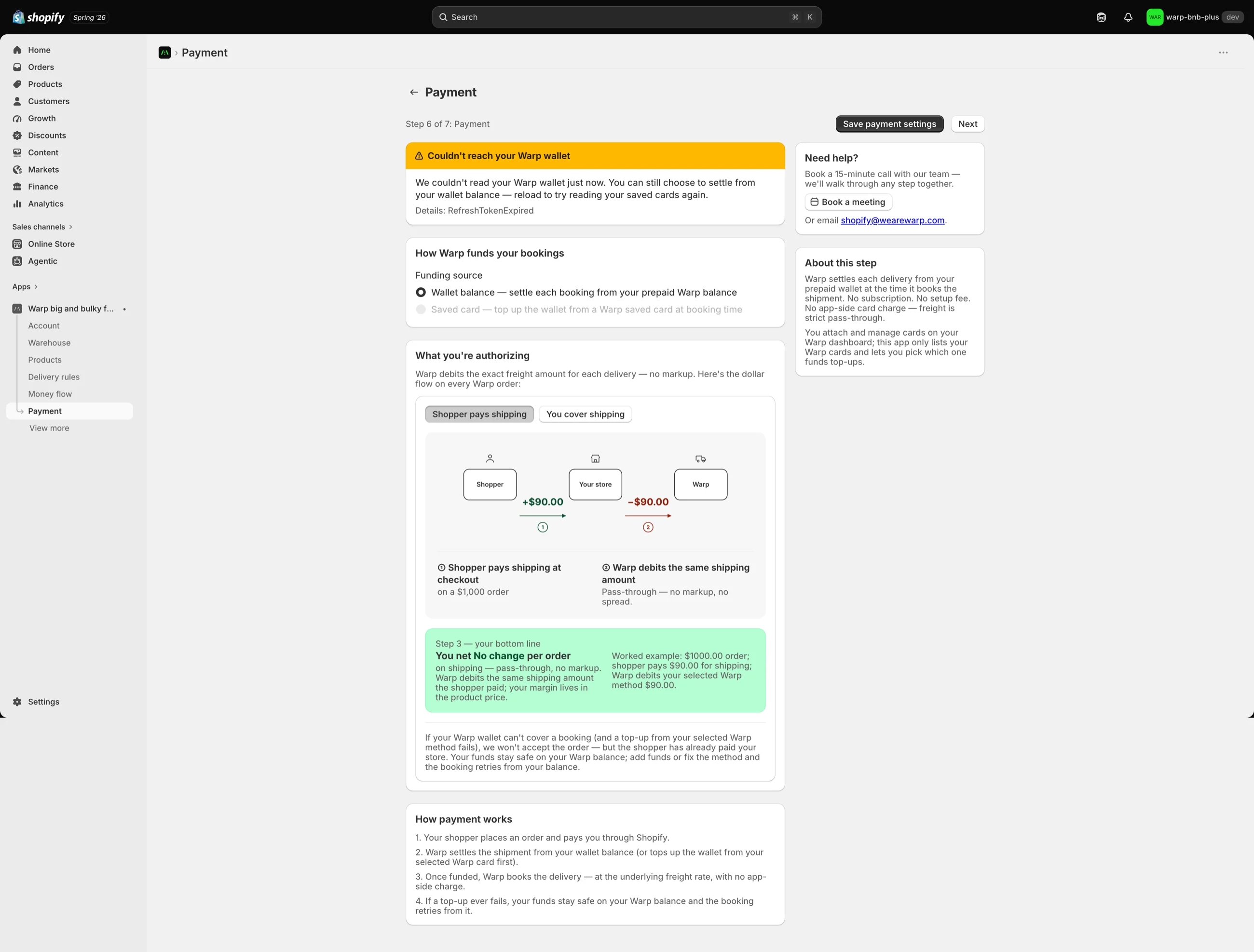
The payment step in the Shopify admin: the funding source is set to 'Wallet balance, settle each booking from your prepaid Warp balance,' with no card-entry field anywhere. A 'What you're authorizing' panel shows the pass-through dollar flow, and an amber banner honestly reports a failure state, 'Couldn't reach your Warp wallet.'
Fig. 13Compliance by subtraction. The redesigned payment step: link Warp, settle from a wallet balance or a saved Warp card, with no card-entry field anywhere in the app. Even the failure is honest: the amber banner tells the merchant the wallet could not be read and what they can still do, instead of pretending it is fine.
07 The honest line Where it really stands

Honest about what it is, and what it isn't.

The app is built, hardened, submitted to Shopify review, and verified working live on a Plus development store. It is not publicly listed, so no real shopper has used it yet. I am precise about that.
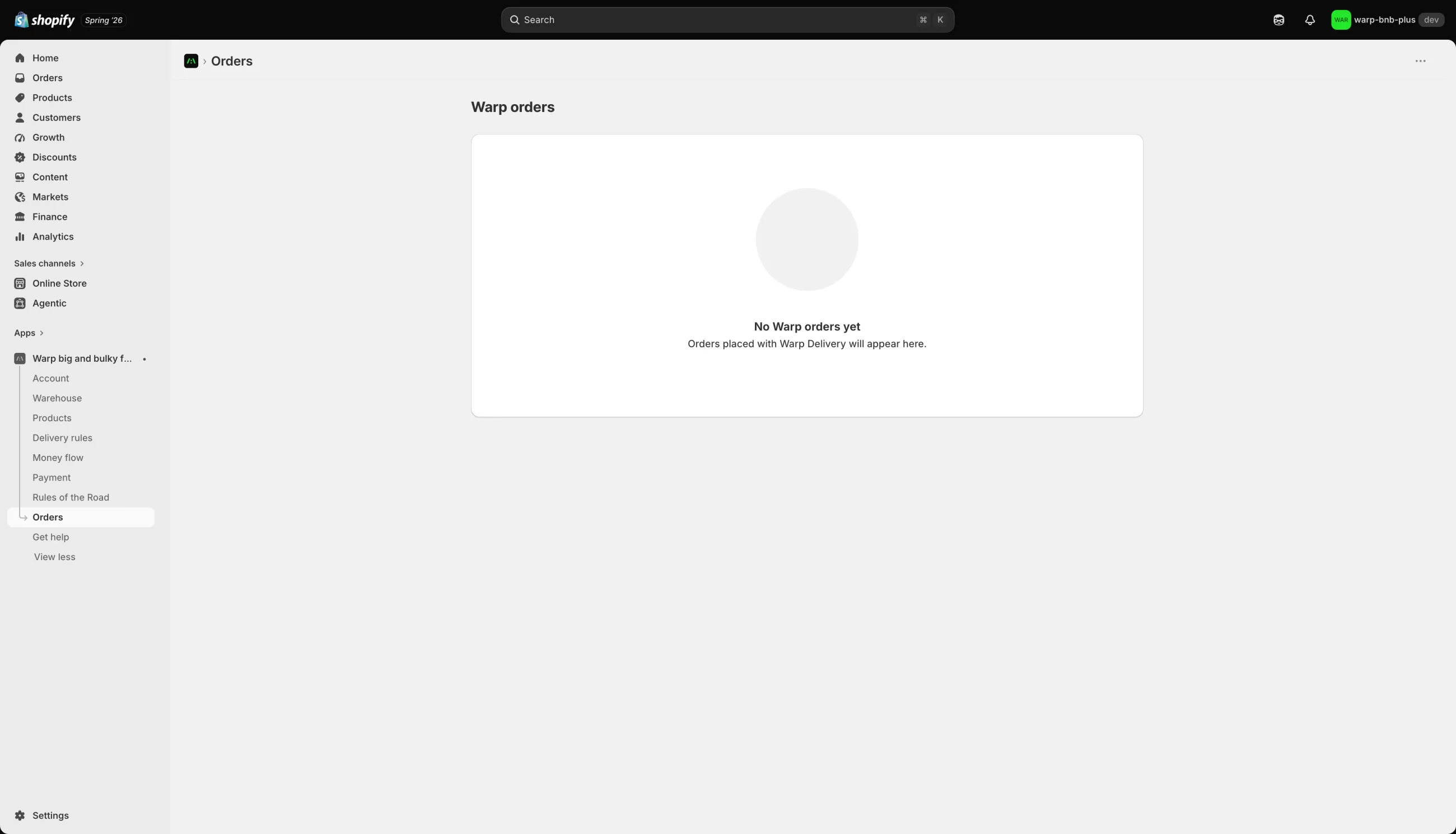
The Warp orders screen in the Shopify admin showing an empty state: a large centered message reading No Warp orders yet, with the subtext that orders placed with Warp Delivery will appear here.
Fig. 14Zero, shown plainly. The Warp orders screen, exactly as it stands: "No Warp orders yet." The app is submitted, not publicly live, so there is nothing here yet, and the ledger below is just as literal about what I can and cannot claim.
What I can prove
The full checkout, verified live on a free Shopify Plus dev store on July 6: the scheduler card rendered and four dated Warp rates appeared.
The first submission was reviewed in under three hours against a four to six week queue, and came back with one bug. A fast first look, never an approval, and I say it that way.
A maximum-effort submission audit found zero blockers across the money path, checkout, webhooks, and security.
A solo build, every line mine, and a test suite at 1,493 green.
What I won't claim
Installs, active merchants, or GMV. There are none, because it is not publicly live. A zero dressed up as a result is still a lie.
Any conversion or order-value lift. "A better delivery promise sells more couches" is the bet this whole thing is built on, not a number I measured.
Adoption of any kind. One furniture store was lined up as the anchor partner. That is a prospect, not a metric.

What is real here is the judgment and the craft: taking a founder's whiteboard sketch to a rigorously built, compliance-aware, submitted product, solo, and holding the line on scope and honesty the whole way. That part is true whether or not anyone has installed it yet.

08 Reflection The lesson cost six weeks

Read the platform before arguing with it.

Half the hard parts here were not design or code. They were understanding what Shopify actually allows, its Plus-only surfaces, its carrier rules, its billing policy, and designing inside that instead of wishing it away. The six weeks I lost were six weeks of arguing with a platform rule instead of reading it.
Kept
Refusing the convenient fiction. Every time I turned down a fake "confirmed" or a two-hour window we could not hit, the checkout got clearer and easier to trust.
Would change
I accepted "the card can't render" as unfixable for weeks. The free Plus dev store was in the docs the whole time. Read the platform before arguing with it.
Carried
Honesty as a design material. It started on an earlier app, and this is where it held up against real money and a real reviewer.
The submitted listingThe App Store screens
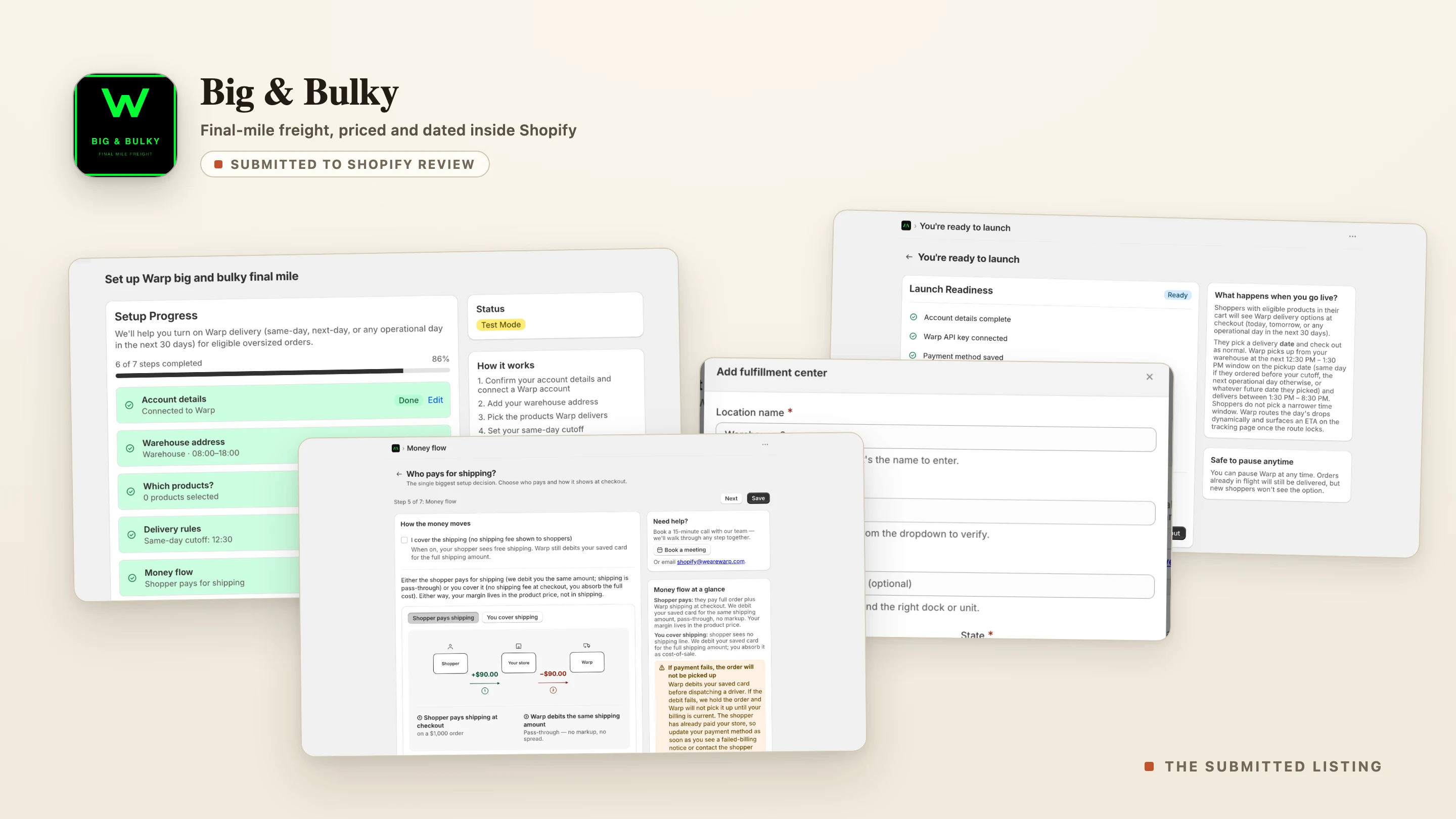
A montage of the submitted Warp Big and Bulky listing: the app icon and wordmark, a submitted-to-Shopify-review tag, and four real Shopify admin screens, the onboarding home, the add-fulfillment-center step, the money-flow diagram, and the launch-readiness check.
Fig. 15The submitted listing. The Warp Big & Bulky app icon and four real screens from the Shopify admin: the onboarding home, the warehouse step, the money-flow diagram, and the launch-readiness check.